

Soldering systems
Desktop soldering robot
Repeatable point and drag soldering
QUICK lists desktop soldering machines. Define joint access, tip, solder feed, fixtures and programmed path for the application.
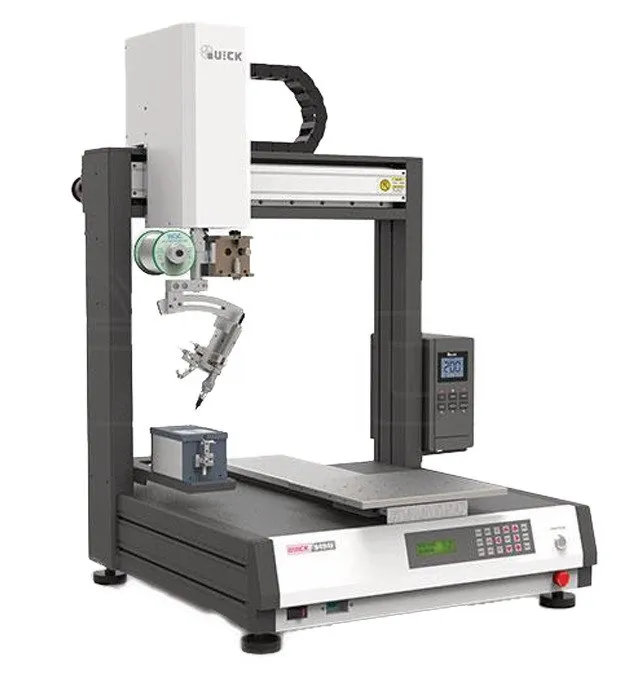
Product or family illustration. Configuration may vary.
Key features
- Desktop soldering configurations require application-specific fixtures, joint programming and tip selection.
Technical information
Ask a sales representative for the datasheet and configuration for your application.
Contact our sales teamCapabilities and options depend on configuration and process conditions. Confirm your requirements with an applications engineer.
Applications
- Solder individual through-hole connector pins in a manually loaded fixture.
- Program a drag path along a row of accessible terminals on a small assembly.
Other models in this family
Common questions
When does a desktop soldering robot need a fourth axis?
QUICK lists three- and four-axis desktop machines. Evaluate tip rotation when joints face different directions or when the solder-wire approach must change to clear nearby parts.
What samples should I bring to test point or drag soldering?
Provide populated boards, solder wire and your joint acceptance criteria. Include the largest thermal loads and the tightest spacing to check tip geometry, wire access and fixture support.
Explore further
Documentation & references
Use the references for each solution to explore further. Talk to our sales team about the configuration, accessories and requirements for your application.
Images illustrate products or families; they do not establish the revision or accessories of quoted equipment.
Share product information
The right information. Ready to share.
Send this information to your team, or download a QR card with SMarTsol and brand logos for presentations and printed materials.
Let’s discuss your application
Share your requirements to evaluate the right configuration.