
TruView™ X-ray inspection
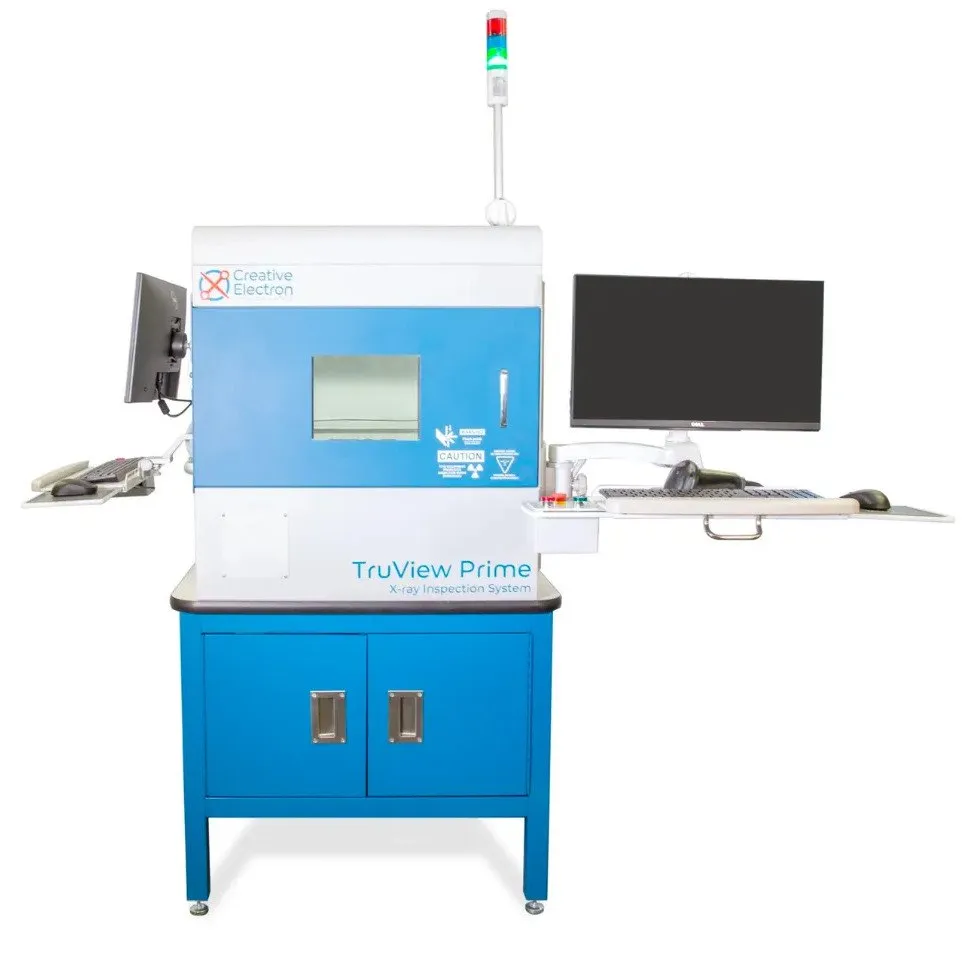
TruView™ Prime
Modular benchtop X-ray inspection
Real-time X-ray images are available moments after you click a button. The live image shows your device as you move it with the automated stage, and TruView™ software runs the analysis with easy-to-program recipes.
TruView™ Prime
Key features
- Standard and custom configurations
- Automated inspection recipes
- Source and detector selection by application
Technical information
- X-ray source
- Up to 130 kV microfocus
- Format
- Benchtop
- Imaging
- Real-time, live
- Standard viewable stage
- 12 × 14 in
- Variable source options
- 90 / 130 kV
- Detector options
- Flat panels from 6 × 6 to 43 × 43 cm
- Sample motion
- X, Y, Z and rotation
- Cabinet (W × D × H)
- 38 × 45 × 45 in
- Electrical supply
- 110–220 VAC, <10 A
Capabilities and options depend on configuration and process conditions. Confirm your requirements with an applications engineer.
Applications
- Repeat the same BGA, QFN and connector checks across boards using programmed stage positions.
- Examine incoming components or investigate a joint without sectioning the assembly.
Other models in this family
Common questions
Which Prime configuration covers a larger board?
Standard Prime has a fully viewable 12 × 14 inch table. Creative Electron lists a 20 × 20 inch inspection area for Prime XL and Prime SDX.
Which version separates layers or checks suspect components?
Prime SDX adds planar CT for overlapping features. Prime R compares internal construction against known-good components, including die size, wire bonds and lead frames.
Explore further
Documentation & references
Use the references for each solution to explore further. Talk to our sales team about the configuration, accessories and requirements for your application.
Images illustrate products or families; they do not establish the revision or accessories of quoted equipment.
Share product information
The right information. Ready to share.
Send this information to your team, or download a QR card with SMarTsol and brand logos for presentations and printed materials.
Let’s discuss your application
Share your requirements to evaluate the right configuration.