Reel handling
Galileo Incoming System
Incoming component registration
Place the supplier label under the camera. Galileo reads its barcodes, assigns the package a unique ID and prints the label used to track it in Archimede.
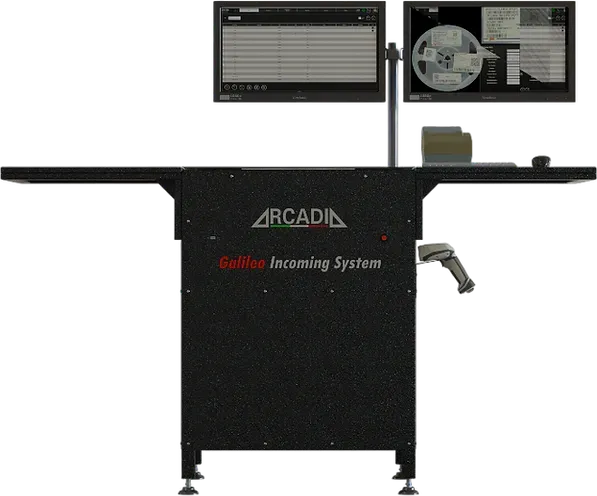
Galileo Incoming System
Key features
- The software interprets supplier-specific label formats and prints a new ID for each package.
Technical information
- Barcode formats
- 1D, QR, Data Matrix
- Operator displays
- 2 touchscreens
- Label capture
- High-resolution camera
- Label output
- Integrated label printer
- ESD provision
- Conductive surface coating
Capabilities and options depend on configuration and process conditions. Confirm your requirements with an applications engineer.
Applications
- Receive mixed suppliers’ reels before stocking them in Archimede.
Other models in this family
Common questions
Can Galileo read both linear and matrix labels?
Yes. Its camera reads 1D codes, QR and Data Matrix. Use actual supplier labels to confirm the data fields needed at receiving.
Does each package of the same part get its own label?
Yes. Galileo creates a unique identifier per package and prints it for use when that package enters Archimede storage.
Explore further
Documentation & references
Use the references for each solution to explore further. Talk to our sales team about the configuration, accessories and requirements for your application.
Images illustrate products or families; they do not establish the revision or accessories of quoted equipment.
Share product information
The right information. Ready to share.
Send this information to your team, or download a QR card with SMarTsol and brand logos for presentations and printed materials.
Let’s discuss your application
Share your requirements to evaluate the right configuration.